Category Archives: VPN

How to Stop Throttling by Your ISP (Verizon, Comcast, AT&T, Spectrum, etc.)

If you’ve ever had videos on YouTube or Netflix stutter or even stop, there’s a chance that it wasn’t a technical snag. Rather, your ISP could be throttling your download speeds.

Even as Wi-Fi and broadband technology advances, it’s not uncommon to see reports that video streaming performance has been dropping dramatically for months on end on carriers like Verizon and Comcast.

Since Netflix, YouTube, and Hulu are notorious for sucking up bandwidth, ISPs are getting aggressive with throttling video streaming. Actions that were taken to slow down peer-to-peer file sharing via BitTorrent are now being taken on video sites and services.

During these periods of less than adequate streaming performance, there’s usually an ISP that bucks the trend. In one case, the only ISP that had improved video streaming speeds while others throttled was Google Fiber. The other major ISPs had revealed their lacking infrastructure and stingy nature once again, and the trend didn’t reverse itself anytime soon.

Why ISPs Throttle

So, why do ISPs throttle in the first place? The best analogy is that of a traffic jam. Too many users want high-quality video in the same locations, causing congestion and therefore slower speeds.

So, if you want video streaming without pauses and munching on popcorn while waiting for the buffer bar to grow at a snail’s pace, you’ll need to think differently than your neighbors.

ISPs target specific websites and apps when setting the peak download speeds for users. A study found that YouTube is generally throttled the most, and Vimeo is throttled the least.

The speed you get can also depend on the relationship the ISP has with the website or app you’re using. Another study found that AT&T targeted Netflix and YouTube for throttling but Amazon’s Prime Video ran at the best possible speeds.

How to Run Tests and Troubleshoot

Researchers have used an app called Wehe to collect data for their studies and so can you.

Wehe measures the speed of apps of your choice such as YouTube and Netflix and compares them with other apps on your phone. After tests are complete with a particular app, Wehe displays the “app throughput” and “non-app throughput.” If the download speed is notably faster when you use other apps it indicates that your ISP has targeted the app for throttling.

Popular apps to run tests on include YouTube, Vimeo, Amazon Video, Netflix, and Spotify. Since short-form video is so popular on social media you may also want to test Facebook, Instagram, TikTok, and others.

It’s important to keep in mind that just because an app is underperforming doesn’t mean it’s entirely due to throttling. A CNET article provided insight from the ISPs’ perspective:

“We offer customers choice, including speeds and features to manage their data,” AT&T spokesman Jim Greer said in an emailed statement. “This [Wehe] app fails to account for a user’s choice of settings or plan that may affect speeds. We’ve previously been in contact with the app developers to discuss how they can improve their app’s performance.”

VPNs to the Rescue

Luckily there is a way around throttling by using a virtual private network (VPN). Since congestion is usually a local phenomenon, replacing your IP address with one associated with a different location is an effective fix.

Ars Technica did a piece explaining how VPNs allow savvy users to find better roads to travel on:

[…] a VPN may route your traffic away from congested servers and links that would normally serve up video to your home. Netflix and YouTube store video caches in many locations, and data can take multiple paths to its final destination.

“Imagine you’re in the US and that you are on a carrier that existed in multiple states and time zones, you can VPN to the West Coast from the East Coast and end up getting the idle servers that are there, just sitting and waiting for people to get out of school and off work and so on,” Bowman said.

Choosing the Right VPN

So now you know why a VPN works, let’s look at what you’ll need to look at when choosing a VPN, shall we?

Using a VPN for this purpose is like taking a toll road. It’s the best route, free of annoying congestion, but you also need to pay to play.

Due to the demanding requirements of video streaming not just any VPN will do, or more specifically any free solution will inevitably lead to frustrating, slow performance, defeating the purpose of using a VPN in the first place.

Currently, my three favorite high-performance VPNs for video streaming are the following:

A VPN is well worth it if you rely on Netflix, YouTube, Hulu, and other streaming services as your main sources of entertainment. It beats paying for a premium internet package that goes beyond what you need.

Conclusion

Despite the long-standing net neutrality movement, the reality is that throttling is here to stay. Your favorite app might perform worse simply because the company that owns it is viewed as a competitor by the ISP.

Popular apps that use up the most bandwidth such as YouTube are commonly targeted by ISPs in an attempt to give the best experience to the most users during peak hours. Ideally, that is how throttling should be used but in practice, ISPs do what gives them a business advantage as well.

The good news is you can use a VPN to bypass throttling if subscribers in a specific location are being targeted. You can change your IP address, test, and see if this change brings better results.


Photo: Rovanato

Top VPN-Ready Routers for Your Home Network

Once the domain of networking specialists in a business setting, routers with VPN capabilities built-in are now accessible to everyone. It’s become one of the top features people look for when choosing a new router for their home network.

It’s true, there’s another way to enable a VPN at the router level.

You can get a router from FlashRouters with business-class DD-WRT firmware installed for you or install it yourself. However, going in this direction isn’t recommended unless you’re comfortable with the complexity it will add to running your network. Simply put, it isn’t as elegant a solution for the average user or small business.

For most people, it makes sense to choose a wireless router with simple, intuitive firmware that’s VPN-ready out of the box. There are more choices than ever that do just that.

VPN-Friendly Brands

Many of the top router brands have followed the lead of Asus and Synology by including VPN features. Nevertheless, the fact remains that both of these names remain the top choices. They are consistently releasing feature-rich routers that allow you to easily connect to a VPN service.

This guide focuses on the brands that offer VPN features across their product line. This empowers you to choose a specific router based on your needs. And to make things easy, a top pick was chosen from both the Asus and Synology camps.

Router You Need vs. One You Want

Accessing the Internet through a VPN uses up more of the router’s resources than a regular connection. Consequently, pay special attention to the CPU specs. A dual-core processor running at 1.0 GHz or greater is recommended. This is to ensure the router CPU doesn’t bottleneck the performance of web browsing, torrents, and downloads.

You need a capable router if you plan to use a VPN, but if taken too far you’ll overpay for a router with horsepower you’ll never tap into. If you live in a very large house, have a big family and/or ISP offering a bleeding-edge connection speed, going high-end may be worth it. However, you don’t need one of the beefiest models just to connect to a VPN.

Asus Wi-Fi Routers

With competitive prices, a wide selection of routers, and deep VPN capabilities across the board, Asus is a good place to start your search.

AsusWRT is the stock firmware preinstalled on Asus routers. It supports OpenVPN, L2TP, and PPTP encryption protocols.

Although not as cutting-edge on the software side as Synology, Asus knows hardware. They’ve been a major player in computer hardware since 1989.

ASUS RT-AC86U (AC2900) (1.8 GHz – dual-core) [Amazon]

ASUS RT-AX3000 (1.5 GHz – tri-core) [Amazon]

ASUS RT-AX88U PRO (2.0 GHz – quad-core) [Amazon]

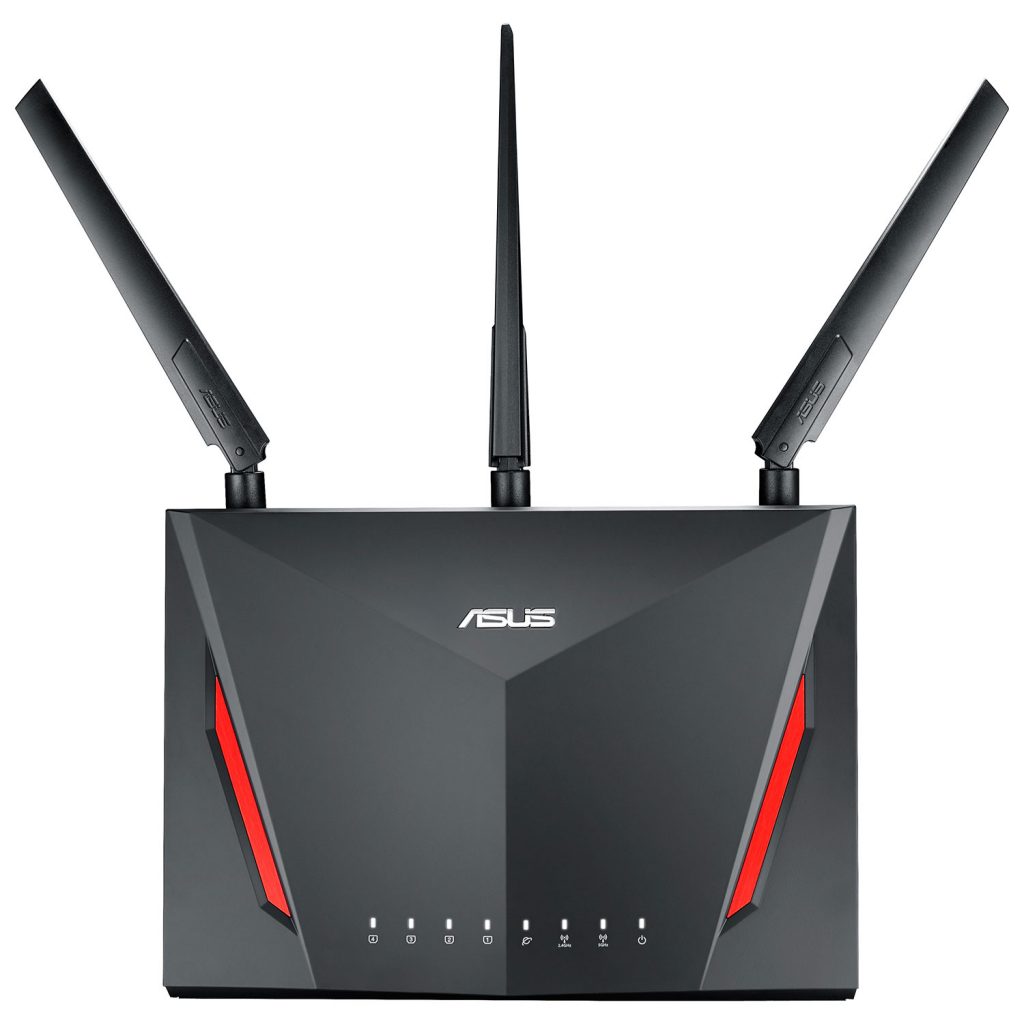
Top Pick: Asus RT-AC86U [Amazon]

Despite its playful exterior meant to appeal to gamers, this is a serious router. It’s powerful enough to cover very large homes and brings cutting-edge tech to the masses.

Asus boasts blistering data transfer speeds of up to 2900 Mbps. The Wi-Fi signal is transmitted dual-band (2.4 + 5 GHz) via the latest 802.11ac MU-MIMO technology. That’s an impressive feat considering the reasonable price point.

Inside there’s a 1.8 GHz dual-core processor, 512 MB of RAM, plus 256 MB of flash storage.

Synology Wi-Fi Routers

Synology is primarily known for its excellent NAS solutions. Nevertheless, the company managed to impress tech enthusiasts with their first router, the RT1900AC, and they’ve built upon that foundation by adding the powerhouse RT2600AC and then the mesh-friendly MR2200AC.

The easy-to-navigate Synology Control Panel allows you to painlessly set up and connect to a VPN service. There is comprehensive protocol support, which includes OpenVPN, PPTP, and L2TP/IPSec.

This interface is like a sleek mini-OS dedicated to your router. And it’s a fresh yet familiar approach.

Synology MR2200AC (717 MHz – quad-core) [Amazon]

Synology RT2600AC (1.7 GHz – dual-core) [Amazon]

Synology RT6600ax (1.8 GHz – quad-core) [Amazon]

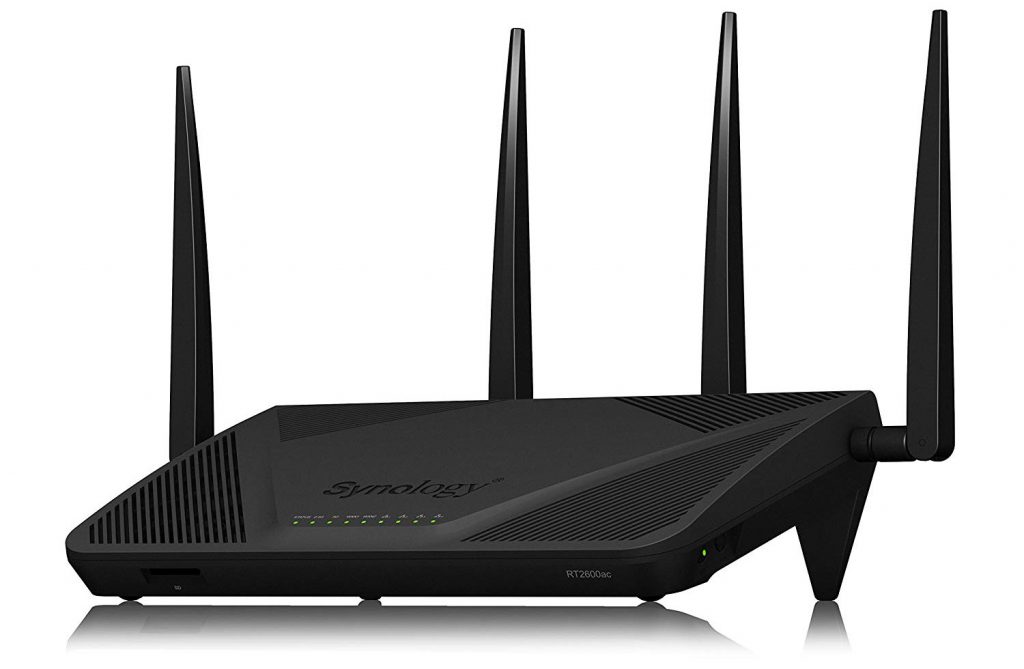
Top Pick: Synology RT2600AC [Amazon]

The RT2600AC is Synology’s former flagship, and it’s now its mid-range offering. This model improves on their first router the RT1900AC in every way. As a formidable unit with four antennas, the gargantuan appearance is matched by solid performance.

Although those who crave AX Wi-Fi speeds should opt for the Synology RT6600ax, most households will be well served by the RT2600AC.

MU-MIMO and the latest 802.11ac Wave 2 standard is supported, giving the router a top speed of 800Mbps and 1733Mbps on the 2.4GHz and 5GHz radios respectively.

It’s powered by a dual-core 1.7 GHz CPU and has 512 MB of DDR3 memory.

Wrapping It Up

Home users are ready for routers with VPN features, but open-source firmware solutions like DD-WRT may not be ready for them. That’s because technical know-how is still needed to gain the rich feature set.

Asus and Synology have managed to balance ease of use with advanced features. So while many are focused on router hardware specs, the importance of superior firmware can’t be ignored.

Tor, VPN or Proxy – Which is Right for You?

Records of an average person’s browsing history may not be worth much, but when you add every citizen of the U.S. to the equation, the value becomes millions of dollars.

ISPs want your personal data so they can sell it to the highest bidder or find ways to upsell you. Advertisers and titans of Web search want to track your online activity so they can display products you’re most likely to be interested in. Finally, governments want access to your online activities, in case they find a reason to monitor them.

These players are becoming a bigger threat to your online privacy by the day, and it’s about time you stood up to this menace. It starts by protecting yourself, namely with Tor, a VPN, or a proxy.

There’s no perfect solution, however, it should be said they’re not all in the same league either. So, let’s look at the pros and cons of each of these technologies.

Tor

What is it?

Known as “the onion router,” Tor is free software that allows you to join their anonymity service. Tor directs traffic through a network of thousands of relays run by volunteers around the world. It makes it very difficult if not impossible for someone to monitor your online activity, and also prevents site owners from seeing your true location.

Over the years, Tor Browser has become the main focus of the Tor Project. It integrates Tor’s technology with a Web browser, making it straightforward to use. Tor Browser requires no setup. However, it won’t hide your activities in other apps such as email, FTP, torrent client, etc.

Only accomplished tech aficionados should tackle their Expert Bundle which is the standalone flavor of Tor. It allows you to manually configure programs to work with it.

Pros

  • Not only is Tor free software, but it’s also a free service which is amazing.
  • Tor Browser is easy to use.
  • Tor Expert bundle allows you to hide your IP address on apps beyond your web browser.

Cons

  • In terms of speed, expect varying degrees of slow. Considering all your browsing data is bouncing around various relays worldwide, it’s understandable why. The other reason is advancements in the network and software are dependent on altruistic contributions, which are short in supply.
  • Since launching in 2002 it has created a reputation for being a favored tool of cyber criminals, spammers, and dissidents. Attempts to hide yourself with it can backfire as Tor users are viewed with suspicion. It can be a red flag for services, businesses, or organizations that can detect its use.

Visit the Tor Project site.

VPN

What is it?

A VPN extends a private network across a public network. It acts as a fast, secure bridge between your computer and the internet, encrypting your data as you browse the web.

With a VPN enabled, websites you visit and prying eyes online can’t see your real IP address. Instead, they’ll see the IP associated with the VPN service. VPNs also allow you to bypass geographic restrictions by allowing you to assume an IP associated with a different country.

VPN access is a service, and just like internet access, you’ll be billed monthly to use it.

Pros

  • Paid service so servers are robust, reliable, and fast.
  • Quality VPN services have huge networks of servers located around the world.
  • Used for professional applications by IT professionals. VPN users are generally granted more trust than Tor or proxy users.
  • Services offer extensive software for use with any OS (desktop or mobile) and with any application.

Cons

  • You need to subscribe to a service with an associated monthly fee.
  • Some companies block their users from accessing services with a VPN.
  • Premium VPNs are generally fast, but using a VPN might cause weaker performance in highly demanding applications such as online gaming.

View a comparison of top VPNs.

Proxy

What is it?

Before VPNs exploded in popularity, proxy servers, and web proxies were the go-to method for hiding your identity. Similar to a VPN a proxy is a gateway between your home network and a public network such as the Internet.

When viewing lists of proxy servers published online, you’ll come across three types: anonymous, elite, and transparent. Basically, the slower the proxy type, the more secure the connection. So transparent is the fastest, and the least secure. Anonymous is in the middle, and elite is the most secure. An elite proxy even tries to hide the fact you’re using a proxy, but it’s the slowest type.

Unlike VPNs which allow you to set up one centralized app that will anonymize all your activity no matter which application you’re using; proxies require extensive configuration. You’ll need to learn the the proxy options well in each app as you’ll likely need to change servers often in search of a solution with decent speeds.

Many companies see proxies as legacy technology and have removed its support from their software to focus on VPN features.

Pros

  • Both free and paid proxies are available although most will want a VPN if they choose to pay.
  • Free proxy lists are plentiful, many of which are checked continuously to ensure the list is fresh and that the proxies are indeed online.

Cons

  • Free proxy servers are run by individuals, not companies that operate with at least some ethical standards.
  • Free proxies are used and abused by spammers and malicious users so you may find the proxy server IP is banned by the site you wish to use.
  • Each app is configured separately with proxies. This can be time-consuming and frustrating due to the likely need to change your proxy server often.

View a free proxy list.

The Final Verdict

Free proxies and Tor are fine for dabblers. However, if you wish to hide your identity on an ongoing basis, you’ll probably lose patience with the unreliability, slow speeds, or hoop-jumping (in the case of proxies) associated with these methods.

The top VPN services recommended here on LetMeBy are fast, trustworthy, and generally the best option for nearly everyone. The only downside is you’ll need to pay for it, but since most VPNs are so fairly priced, this isn’t much of a drawback.

Photo: Ed Ivanushkin

VPNs Have Exploded in Popularity in Canada, Here’s Why

A recent VPN usage survey commissioned by NordVPN found that over one-quarter of Canadians use VPNs.

As a country, Canada landed in the top five in terms of VPN awareness too. Nearly seven Canadians in ten have heard of VPNs. Other countries with above-average awareness include the U.S., United Kingdom, Hong Kong, Poland, Singapore, Taiwan, Spain, and Brazil.

Demographics of VPN Users

If you’re wondering what the typical VPN user looks like, I’ve got you covered. They’re more likely to be male and the largest age group is between 25 and 44 years old. This group leads the way in most other countries as well.

There are two big factors intersecting here: being old enough to have a budget for the extras in life and young enough to recognize the need for better online privacy. Millennials, Gen Xers, and Xennials are right in the sweet spot.

So, getting to the main topic, why are Canadians adopting VPNs faster than countries such as France, Italy, Japan, and South Korea?

What Canadians Say About Their VPN Usage

HelloSafe surveyed Canadians across the country about their VPN usage and there are some notable differences in their results compared to NordVPN’s findings.

First things first, here are the reasons Canadians said they use a VPN:

  • To secure a Wi-Fi connection – 68%
  • To enjoy content from other countries – 36.8%
  • To hide an IP address – 31.5%
  • To avoid censorship – 26.3%

Interestingly, they found that only one in ten Canadians use a VPN at least once a week. That’s a big difference from what the study for NordVPN found. However, how HelloSafe phrased the question pushed the figure down. How many people are aware enough of their VPN usage to give an accurate response?

Although general adoption is undoubtedly higher, HelloSafe’s study could indicate that Canadians are using VPNs with a purpose in mind. While there are plenty of reasons to have your VPN enabled all the time, it’s common for people to use their VPN only when they want to achieve a specific outcome.

Reasons Canadians Should Use a VPN

Now that we’ve looked at the responses Canadians gave about their VPN usage, let’s look at the benefits in detail.

1. Safeguard Your Data

Companies and Institutions want your data to make informed decisions. Data about customers and potential customers is a valuable resource to them.

When you use online services, data about your usage and behaviours become part of a massive data set. It often happens without the user’s knowledge and their ongoing consent. Rather, the details about data collection are buried somewhere in the companies’ terms of service or privacy policy.

Additionally, malicious users and cybercriminals are always looking for ways to gain personal information to aid in their agenda.

VPNs give you a powerful way to opt out of excessive data collection which is now the norm. It protects your identity online by hiding your IP address. This makes it difficult or impossible for others to pinpoint your device and your location.

2. Get Access to Geo-Restricted Content

It’s normal for Canadians to feel left out when their favourite TV shows and movies aren’t available on streaming apps. Harry Potter, Good Fellas, and Seven are just a few examples of classic movies that aren’t available on Netflix Canada.

Canadian subscribers typically get access to less content overall than Americans on streaming sites such as Netflix, Hulu, and Amazon Prime Video. It works the opposite way too as shows like The Office and Fargo are available for streaming in Canada but not in the U.S.

Websites and apps sometimes use geo-targeting to determine which content or content libraries to display to the user. It’s annoying when music in social media posts, videos on websites, news, etc. are blocked in specific countries.

VPNs replace your IP address with a different IP located in the country of your choice. This allows you to view content intended for people in any country in the world.

3. Make Public Wi-Fi Safe

Public Wi-Fi is notorious for its slow speeds and spotty stability, but it’s security that people should be most concerned about. A survey by All About Cookies found that one in four experienced a security issue from accessing the internet through unsecured networks.

It’s best to assume the Wi-Fi you use in restaurants, hotels, or at the airport isn’t secure. That means your private data, including login credentials associated with sites you visit, is being transmitted with no encryption and could be intercepted.

Any time you use a VPN, the data being transferred from the network to your device and back is protected with the highest level of encryption.

4. Protect Your Identity When Playing Online Games

Online gaming is huge, and while it’s incredibly fun to explore digital worlds, being connected with so many other players has its risks.

Gamers have to watch out for malware, account takeover, phishing attacks through messaging, data breaches, and many other threats.

Gaming platforms like Steam and PSN collect plenty of data about their customers. While you can drill down into the privacy settings and make changes, there are certain types of data collection you might not be able to opt out of.

VPNs make it impractical or impossible for malicious gamers, gaming platforms, and third parties to see the IP address of your PC or pinpoint your location.

Looking for the Best VPNs?

It’s getting more common to see VPNs packaged with other software and services such as comprehensive online security suites. However, there’s power in choosing the best VPN for you rather than settling for solutions that try to do everything.

If you’ve never used a VPN before or are looking for a new one, have a look at LetMeBy’s top 3 VPNs.

Conclusion

There’s been a big boost in awareness and usage of VPNs. At this point, most people have heard of VPNs and they have a rough idea of what they do. Canadians are pushing forward and taking control of their destiny online.

Still, we’re in the early days in terms of leveraging privacy enhancement tools like VPNs. Canadians are using VPNs to achieve their goals but if the data from HelloSafe is accurate, most haven’t jumped in with both feet yet.

VPNs Protect You but Aren’t a Substitute for Antivirus

VPNs get a lot of praise for their ability to boost one’s privacy online. Many wrongfully assume that because VPNs hide their IP address and offer a high level of encryption, they’re protected without antivirus software.

In actuality, VPNs and antivirus software serve completely different purposes.

Although using a VPN makes it nearly impossible to determine your identity through certain means, it won’t stop other methods to get hold of your private data such as phishing.

It’s estimated that one-fourth of PCs have no virus protection. That’s a camp you don’t want to be in. Unprotected machines are 5.5 times as likely to get infected.

Cybercriminals have gotten craftier and bolder than ever. On top of that, bad actors are taking more action than ever. Cyberattacks increased 125% in 2021 compared to the previous year. And there are no signs of it slowing down.

The bad guys have adapted and so will internet users. Those who use both antivirus and VPN are being proactive and are best prepared for threats now and in the future.

How Antivirus Software Protects You Online

One of the key components of antivirus software is its database. Online threats are always evolving so antivirus software downloads the latest threat database automatically before scanning your computer.

Security software either detects threats in real-time as soon as they appear or during a scheduled or manual scan of your hard drive. If malicious code is detected it’s either quarantined or deleted.

Malware is a generic term that includes many types of harmful software such as viruses, trojans, worms, and spyware. The next category everyone needs to be aware of is phishing. This is when bad actors pretend to be legitimate companies and services to extract personal data such as login details and credit card numbers.

Security software such as Norton 360 and Kaspersky Internet Security have a comprehensive approach so you’re defended from information security threats, network attacks, phishing attacks, and spam.

How VPNs Protect You Online

Data is incredibly valuable to businesses and institutions. There’s a whole industry dedicated to it, often referred to as big data. In 2022, the big data analytics market size was estimated to be worth USD 272 billion.

Private data is also valuable to shady third parties and cybercriminals which is the most immediate threat to the average internet user.

Thus, with each passing year, it’s more and more important to be mindful of how you protect your privacy online. There are plenty of improvements you can make by drilling down into the privacy settings of the online services you use. However, companies will never give you full control of your privacy. By using a VPN, you easily and effectively level up your privacy across all the apps and platforms of your choice.

VPN is short for Virtual Private Network. Essentially, you can think of a VPN as a tunnel that encrypts all data that moves between your internet connection and your device.

It replaces your true IP address with an IP associated with the location you select. This makes it nearly impossible for people and organizations to determine who you are and where you’re located by viewing your IP address.

To learn about the top 3 VPN services recommended on LetMeBy, visit this page.

Using Both Antivirus Software and a VPN is the Best Defence

Antivirus software and VPN apps complement each other perfectly. One if your best defense against malware and the other is your best defense against companies, third parties, and organizations compiling data about you based on your actions online.

VPNs have security benefits as well as it encrypts data during transit. This protects you from attackers that aim to intercept data going to your device or network. Once the data has reached your device, it’s up to antivirus software to deal with threats.

Antivirus software is essential. This is why Windows Defender is pre-installed on any current Windows machine. VPNs have seen an incredible boost in adoption in the past several years, but not every internet user needs a VPN. Everyone can benefit from using a VPN, but you need to value your online privacy to want it.

Wide-ranging security software is becoming more common. These solutions include both antivirus and VPN software.

Is Windows Defender Enough?

You might be old, but are you old enough to remember downloading McAfee on your new PC after installing Windows XP?

Windows has come a long way since then in terms of security features. Before the release of Vista, Windows users had to get third-party antivirus to protect their computers. Today, Windows Defender is preinstalled and Windows automatically downloads and applies the latest security updates.

Windows machines don’t really need third-party antivirus software since Windows Defender is perfectly capable.

The main reason to get third-party antivirus software is you find its features compelling. For example, gamers appreciate “gaming mode” which is found in software such as Kaspersky Internet Security. By enabling it, functions such as system scans and notifications won’t interrupt your gaming experience while the antivirus works in the background.

Full security suites provide the most added value. These software packages protect you from spam, unsafe websites, shady applications, webcam breaches, and more.

Conclusion

It’s easy for Windows users. Simply add a VPN to complement the antivirus software already preinstalled: Windows Defender. This gives you protection where it matters most. Still, when something is easy, we sometimes lose sight of what’s working for us in the background. Antivirus software is essential and VPNs are in no way a replacement for it.

Online privacy and protecting yourself from malware are related and more than ever there’s overlap between the two. However, for the best solution is to use both a VPN and antivirus.