Tag Archives: Netflix

Netflix Not Working With VPN: Easy Fixes

Just when you’ve grabbed your popcorn and got cozy on the couch, technology has other plans. You fire up Netflix, connect to your VPN, and instead of your show, you get an error message. Frustrating? Absolutely. Is it common? Very.

The good news is that this issue is usually easy to fix. All you need to do is run down a list in a troubleshooting guide such as this one and let the process of elimination work its magic.

Let’s break down what’s happening so you can get back to your favorite content.

Decoding Netflix’s Streaming Error

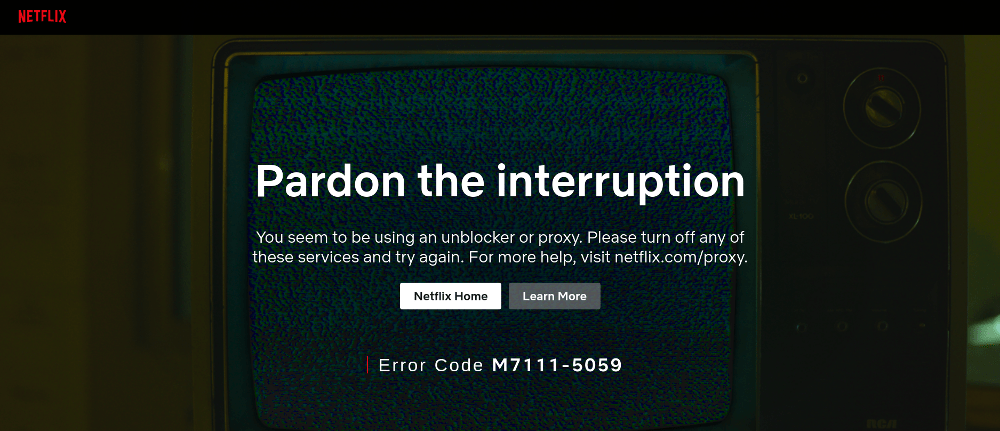
First, we’ll turn our attention back to that dreaded error. If you’re using a VPN and Netflix detects it, you’ll likely see a message like this:

“You seem to be using an unblocker or proxy.”

This typically comes with an error code such as M7111-5059 or M7037-1111.

So, what’s going on behind the scenes? Netflix compares your IP address against known VPN and proxy IP ranges. If it detects one, it blocks access to region-specific content. Thus, for as long as you have the same IP address as you have now, you’re probably out of luck until you take action.

Why and How Netflix Blocks VPNs

You’re a paying customer in good standing, so why do you have to deal with this?

Netflix enforces regional licensing agreements. The studios that produce the content only want certain shows and movies available in specific countries. They can either make that call for legal or business reasons. To comply, Netflix actively works to detect and block VPN usage because they know you’re using it to bypass its restrictions.

They do this by:

  • Monitoring large numbers of users sharing the same IP address
  • Flagging IPs associated with data centers (common for VPNs)
  • Using advanced detection systems to identify proxy traffic

This is why even reliable VPNs occasionally stop working. It’s a constant cat-and-mouse game. The reality is, if you want access to content outside your country, some tinkering is required on an ongoing basis.

Your Netflix Account Is Safe

If you’ve never encountered this before, it could be time for a deep breath. Let’s clear up a big concern: Netflix does not ban accounts for using a VPN. They want your business, but they also need to keep the studios that make their platform possible happy.

At worst, you’ll be temporarily blocked from streaming until you disconnect the VPN or switch to a working server.

Your account, subscription, and watch history are all completely safe.

How to Access Netflix When Your VPN Doesn’t Work

It’s time to jump in and start troubleshooting. Here are the most effective fixes, starting with the simplest:

1. Connect to a Different Server

VPN providers often have multiple servers in the same country. If one is blocked, another might still work.

Typically, you use the VPN app to select a different IP address associated with a different state in the US. Some apps show you a map, making it intuitive to switch.

👉 This is the fastest and most effective fix in most cases.

2. Clear Your Browser’s Cache and Cookies

Old location data stored in your browser can conflict with your VPN. If Netflix detects a discrepancy, it may block you from connecting to the service.

Go to the privacy settings in your browser and look for stored data you can delete.

  1. Clear cache and cookies
  2. Restart your browser
  3. Reconnect to Netflix

3. Log Out of Netflix and Sign Back In

Sometimes, Netflix holds onto your previous location session. To force a refresh, log out and then log back in.

It’s one of the oldest tech tricks in the book, but it only takes a few seconds to test.

4. Try a Different Browser

Browsers handle location data differently. If you’re having trouble in Chrome, try another application such as Firefox, Edge, or Safari.

Additionally, if you’re testing with a browser you don’t commonly use, make sure the version is up-to-date.

5. Try a Different Device

Using a different device can allow you to efficiently work around the problem rather than trying to pinpoint it.

As an example, if your smartphone or tablet isn’t working with Netflix, try:

  • Laptop
  • Smart TV
  • Streaming device (like Fire Stick)

This helps determine if the issue is device-specific. Sometimes a mobile device’s OS has restrictions that allow data to be leaked, so VPN usage is detected.

6. Update the VPN App

Outdated VPN apps may use older IP ranges that Netflix has already blocked.

Make sure you’re running the latest version of your VPN app. It’s always a good idea to keep it updated anyway for security reasons and to take advantage of the software’s latest enhancements.

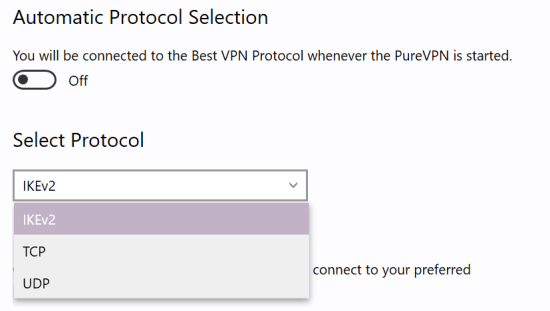
7. Change the VPN Protocol

Here’s a more advanced feature that many VPN users aren’t aware of. By switching protocols, your VPN can sometimes bypass detection on Netflix.

Common options include:

  • OpenVPN
  • WireGuard
  • IKEv2

Many VPN apps let you toggle this in settings.

8. Use Smart DNS

Smart DNS reroutes only your DNS queries instead of your entire connection. In the process, your location data is wiped so it can’t be detected by Netflix.

Some VPN services, such as NordVPN, have Smart DNS features built right into their app. More commonly, it has to be set up manually.

Pros:

  • Faster speeds
  • Less likely to be blocked

Cons:

  • No encryption (less privacy, but adequate for streaming)

9. Disable IPv6

If your device uses IPv6 while your VPN only protects IPv4, your real location is exposed.

Disable IPv6 in your network settings to force IPv4 routing.

In many cases, VPNs handle traffic that is routed over IPv4 more reliably.

10. Get a Dedicated IP Address

Shared IPs are easier for Netflix to detect as they’re used day in and day out by many users. A dedicated IP is used only by you, making it less likely to be flagged.

This is usually offered as a paid add-on by VPN services. For people who frequently need a US IP address, it’s worth it.

11. Ask Customer Support for Assistance

Good VPN providers track which servers work with Netflix.

Contact support and ask:

“Which servers currently work with Netflix?”

You’ll often get a quick, accurate recommendation.

If the issue is widespread, they’ll let you know they’re working on the issue and could give you details about when it could be resolved.

12. Switch Your VPN Service Provider

Not all VPNs are created equal when it comes to streaming.

If nothing works, it may be time to switch to a provider known for consistently bypassing Netflix blocks. Before you decide, check out the top 3 VPNs recommended by LetMeBy.

Conclusion

Running into VPN issues with Netflix is frustrating but rarely complicated to fix. In most cases, simply switching servers or clearing your cache does the trick.

If not, working through the steps above will almost certainly get you back to streaming your favorite shows. And remember: they’re not picking on you. It’s just Netflix doing its job.

Now, back to the couch and the next episode of Stranger Things.

Netflix US vs. Canada: Which Wins on Content?

Does this story sound familiar? A Canadian Netflix subscriber hears about a hot new show on social media. The show is supposedly on Netflix, but it’s nowhere to be found.

Netflix is a global entertainment giant, but its content library varies significantly from country to country. In particular, Netflix US and Netflix Canada offer distinct collections of movies and TV shows, each with its strengths and weaknesses. While both regions share a vast number of popular titles, there are key differences that can make one library more appealing than the other.

Comparing Content Libraries

Netflix US once boasted a larger overall library compared to Netflix Canada. However, now Canada is on top.

According to recent data, Netflix US offers 6,389 titles in total, including about 2,438 TV shows and 3,951 movies. Meanwhile, Netflix Canada has approximately 6,734 titles, with about 2,376 TV shows and 4,358 movies.

This disparity in content is primarily due to regional licensing agreements and content acquisition strategies. It’s important to note that exclusives in the US and Canada change over time as Netflix’s libraries are constantly evolving.

US-Exclusive Titles

The main reason people want to use Netflix US outside of the US is to gain access to exclusives. Some movies and TV shows are only available to US subscribers.

Notable examples of these shows include Grey’s Anatomy and NCIS. Also, movies like Spider-Man: Across the Spider-Verse, Joker, and May December are US exclusives.

US exclusives often include critically acclaimed series, blockbuster films, and niche genres that may not be accessible in other regions.

Canada-Exclusive Titles

Despite having a smaller library of TV shows, Netflix Canada offers unique content that can’t be found in the US. Additionally, Netflix Canada has more movies than Netflix US.

Movies like The Untouchables, The Hunt, and Blue Valentine are on Netflix Canada, but they currently can’t be streamed in the US. Some acclaimed movies like The Devil Wears Prada and The Shawshank Redemption aren’t on Netflix US either.

The exclusives on Netflix Canada often include Canadian-produced series, international films, and critically acclaimed indie content.

Why the Differences?

US and Canadian audiences enjoy much of the same content, so why does Netflix have different libraries for each country?

The differences in content libraries between Netflix US and Netflix Canada come down to licensing agreements. Netflix negotiates distribution rights with content creators and studios, and these agreements are often limited by country or region. As a result, Netflix may have the rights to stream a specific title in one country but not another.

Which Library Is Better?

Many Canadians wonder if the grass is greener in the US in terms of streaming content.

For most viewers, Netflix US is generally considered the superior library due to its larger selection of mainstream films and popular TV series. However, Netflix Canada is an attractive option for those seeking a blend of mainstream and international content, along with a curated selection of Canadian productions.

Netflix Canada’s library has been making big gains and it’s now larger than Netflix US. For sheer variety and quantity of movies, Canada has an edge.

Who Should Choose Netflix US?

  • Viewers looking for the latest blockbuster movies and trending TV shows
  • Fans of US-exclusive content, including classic shows like The Office (US), Charmed, and The Wonder Years
  • Those seeking the biggest movies and shows everyone is talking about

Who Should Choose Netflix Canada?

  • Fans of Canadian films and TV shows
  • Viewers interested in international and indie content
  • Those seeking a slightly more curated selection of titles

Using a VPN to Access Both Libraries

These days, the Netflix library you’re shown in your country is just the starting point.

For viewers who want the best of both worlds, using a Virtual Private Network (VPN) can provide access to both Netflix US and Netflix Canada libraries from anywhere in the world. However, Netflix actively works to detect and block VPN usage, so results may vary depending on the VPN provider.

Check out LetMeBy’s list of the top VPNs here.

Conclusion

So, which library is better? There’s no clear winner here. There are far more similarities than differences, but the differences stand out when you’re looking for a specific movie or show.

While Netflix US offers a broader selection of mainstream content, Netflix Canada stands out with its curated selection of Canadian and international titles. Ultimately, the better choice depends on individual viewing preferences. Though with a VPN, viewers can experience both libraries and enjoy all the content Netflix offers worldwide.

How to Watch US Netflix in Canada

Oh Canada, you’re lovely but Canadians can’t help but want the stuff Americans have. Although the CN Tower and Whistler’s ski resorts are iconic, sometimes one craves New Orleans’ cuisine or the energy of New York City.

Netflix Canada has come a long way. It ranks third in terms of having the most content and is one position behind the US which is second. Still, depending on your watching habits, many think that Netflix US is far ahead.

US Netflix Vs. Netflix Canada

On paper, there doesn’t seem to be a huge difference between the content library in Netflix US versus Canada. According to a snapshot of its content in 2022 Canada offered about 5,730 titles (both movies and TV shows). And Netflix in the US had 5,879 titles. That’s only 149 additional titles to choose from. However, don’t let the stats fool you!

Netflix US has the top-rated TV shows so many are itching to watch! Healer, The Best of Enemies, The Office, and Grey’s Anatomy are examples of popular shows that Canadian Netflix subscribers don’t get access to. The American version of Netflix shines when it comes to its selection of TV shows.

Netflix Canada has its strengths too. Canadians get access to some award-winning movies that Americans don’t such as Wind River, Hell or High Water, and Eastern Promises. Additionally, their Canadian library has some TV shows like Pretty Little Liars and Fresh Prince of Bel-Air which are nowhere to be found on US Netflix.

Why Netflix US has Awesome Shows Canadians Don’t Get

It’s a bit frustrating. Why are Canadian subscribers excluded from some of the best content on Netflix? First, we need a basic overview of how the TV and film industries work.

Although Netflix is the service that delivers all the programming the vast majority of its content is supplied by movie studios, television networks, and other providers.

Netflix signs contracts with each company that creates content so new titles can be added to their libraries. In those contracts, the studios and networks specify which regions get access to their titles and which ones don’t.

Thus, Netflix is simply following these contracts and delivering content according to the requirements of its creators. Most of us will never know exactly why The Office isn’t available to Canadians. Customers simply have to work with the cards they’re dealt.

How Netflix Knows Its Subscribers are Based in the US or Canada

When you visit Netflix’s website it automatically directs you to a regional version of their site. So, if you live in Canada it ensures you’re doing business with Netflix’s Canadian operations. It means you’re billed in CAD and get access exclusively to their content for Canadian subscribers.

Each time you use the Netflix app to watch programming the app detects where you’re located. Your smartphone, PC, or other device has an IP address associated with it. That IP is a quick, effective way for providers to know what country you’re accessing their service from.

So, in theory, it doesn’t matter if you signed up with Netflix Canada or Netflix US. What’s significant is the country you’re currently accessing Netflix from. To test this, Canadian subscribers can watch Netflix while they’re on vacation in the US. Voila, they’ll have full access to Netflix’s US content library.

How to Watch Netflix’s US-Only Content in Canada

To view the Netflix US content library, you need to appear to be in the US when the Netflix app or website checks your location.

The most effective way to watch Netflix in Canada is by using a VPN. What’s that? It means virtual private network. A VPN works between your internet service provider and the website or app you’re connecting to. It creates an intermediary layer that enhances your security and privacy online. VPNs make it easy to change your IP so you can choose an IP address that is associated with any country.

Over the years Netflix has detected that many users are accessing their app and website from the same IPs. So yes, they’re wise to the use of VPNs to view regional content. In fact, some IPs won’t work with Netflix, and some VPN services are better than others for streaming Netflix. If too many people are already using the same IP address users can be temporarily denied access. The good news is this is often solved simply by choosing a different IP address from those provided by your VPN.

Tips on Choosing the Right VPN for Watching Netflix

Netflix is constantly improving its tech and refining its policies. One example of this is their crackdown on password sharing which started at the end of 2022.

Before subscribing to a VPN service it’s advised that you check the latest posts on Reddit’s r/NetflixViaVPN community. Redditors there share which VPNs they’re using and which VPNs work with Netflix as well as which ones don’t.

To ensure you go with a solid VPN service overall read LetMeBy’s reviews of the top 3 VPN services.

Want the fastest answer? These are the VPNs most commonly recommended here for watching Netflix US in Canada:

When it comes to the best VPN services for streaming, speed is a key factor. HD video takes a good amount of bandwidth and all that data is sent through your VPN. Pretty much any VPN that requires a monthly subscription is speedy and capable of streaming high-quality video.

Are There Risks Associated with Watching Netflix US in Canada?

It’s clear that Netflix is aware that people use VPNs to unblock content and they’d rather their subscribers didn’t. Using a VPN is against their terms. However, a lot of Netflix subscribers have a VPN. It’s becoming more and more common to use VPNs for general internet use and most people that have one never turn it off.

Netflix aims to enforce its rules while keeping its subscribers. So, Netflix won’t toss you off its platform for watching TV shows and movies with a VPN. At worst an IP address provided to you by your VPN will be blocked by Netflix. In many cases, it’s just a question of choosing a different IP that isn’t on their radar.

Wrapping It Up

Some of the best TV shows are on Netflix US but Canadian subscribers don’t need to feel left out. A Canadian Netflix subscriber with a VPN gets the best of both worlds. This gives you access to content that Americans don’t get, plus all the exclusive content available in the US.

VPNs are handy for watching Netflix but that’s really just the beginning of their applications. Browsing the Web while knowing your every action isn’t being tracked is a liberating experience.

VPN Not Working with Netflix? Here’s How to Fix It

Have you used a VPN with Netflix then encountered an error page you weren’t expecting?

You’re not alone. Netflix wants their customers see content intended for their region only. And they’re well aware that plenty of users want to bypass that restriction.

If you reached an unplanned popcorn break, odds are this is the page that appeared:

So, is this the end of the road for using VPNs with Netflix?

Not at all! Although Netflix has made it harder to use a VPN to view content outside your region, it still works if you’re using an IP that hasn’t been identified as a VPN.

Quick reminder: To achieve anonymity VPNs replace your true IP address with an IP associated with the VPN service. So, for example If you select a US location with the VPN software it will mask your actual location and assign you with an IP address in the US that they own.

Now that everyone knows how it basically works, let’s look at how you can solve this issue.

How to Get Past the Netflix Streaming Error Page

1. Try a different server

If your VPN allows you to select a different IP located in the country you desire, try that.

It’s possible the IP you’re accustomed to using has been blocked by Netflix, but other IPs that can be selected with your VPN software work fine.

Of course, if you don’t have the option to select a different IP address directly, you’ll want to move to the next troubleshooting suggestions below.

2. Change the VPN protocol

Surprising as it may sound, sometimes you can work around the problem simply by switching to a different protocol with your VPN software.

There are a number of protocols in existence, however the ones you can utilize will vary depending on your VPN provider.

The most common VPN protocols are:

  • PPTP
  • L2TP/IPSec
  • OpenVPN
  • SSTP
  • IKEv2

Speed and the level of security is different with each protocol, and they all have their pros and cons.

The only one you should think twice about using is PPTP as this is the oldest protocol. The speed is decent but its security leaves much to be desired compared to the other options listed.

Of course, changing the VPN protocol is only a temporary measure if you’re forced to choose a protocol that doesn’t meet your standards. But in most cases, you won’t notice much of a difference.

3. Switch to another VPN

Not all VPNs are good choices for use with Netflix.

If you keep having to jump through hoops to get streaming to work, it could be time to look at alternative solutions.

Some VPN providers are focused on keeping their service working smoothly with Netflix, while its not on the radar for others.

Also, which service works and which doesn’t can change quickly. Some power users are signed up to more than one VPN service to improve their chances of having a solution at their fingertips.

Before switching, do your research to ensure other users are using Netflix without issues. There’s a Reddit group called NetflixViaVPN dedicated to the topic of using Netflix with a VPN. It’s helpful for finding the latest information.

Also, check out LetMeBy’s reviews of the top 3 VPN services as these are the best performers all-around.

How Does Netflix Know You’re Using a VPN?

Streaming services like Hulu, Amazon Prime Video, and Netflix all have systems put in place that aim to detect if you’re using a VPN.

If your IP matches the IPs in their database that they’ve identified as VPNs you’ll get the streaming error page.

The good news is the best VPN services are always adding fresh IPs for their users to select as well as finding ways to allow their customers to keep using the services they love (such as Netflix).

Will Netflix Ban You for Using a VPN?

Although Netflix wants you to use their services as they intended, they don’t want lose you as a customer either.

Internet privacy aficionados have been using VPNs with Netflix for years and there are no reports about even receiving warnings from Netflix for this.

Thus, your Netflix account is safe.

Conclusion

Using a VPN with Netflix can be frustrating at times, but having access to content from different regions is a real game changer for film and TV buffs.

If you come across the dreaded Netflix streaming error page, don’t fret as there’s always a way around it. And if it’s just a question of changing your IP address, or your VPN protocol, consider it a good day.