Tag Archives: online gaming

Can You Use a VPN on Fortnite and Should You?

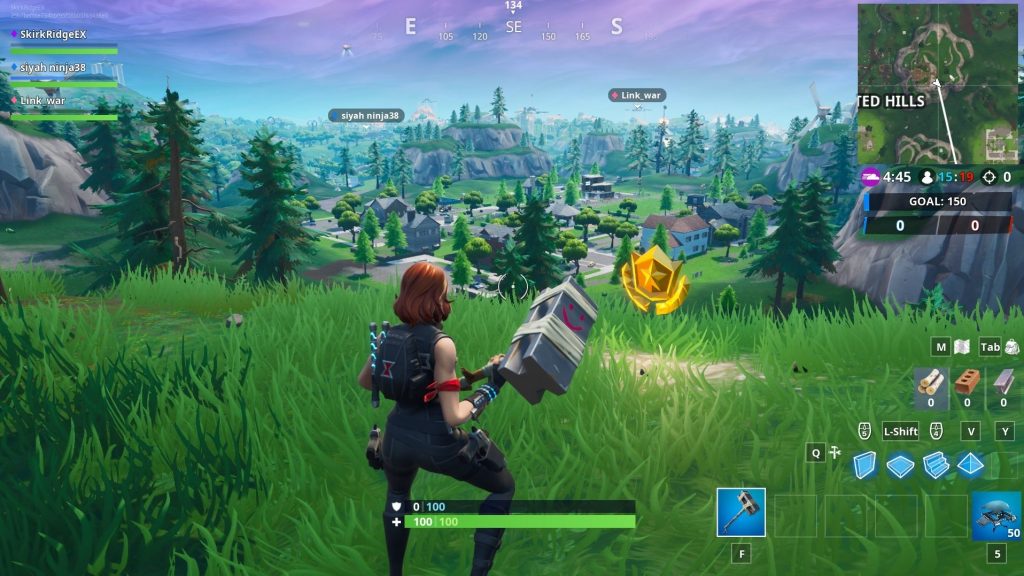
You drop into the Battle Bus, the island stretches out below, and your squad is already arguing about where to land. Maybe you’re chasing that first Victory Royale of the night, grinding quests after work, or jumping in because Fortnite is the one game everyone seems to come back to.

But sometimes the experience isn’t so smooth. Lag spikes ruin firefights. Matchmaking feels sweatier than usual. You can’t connect at school, work, or on a restricted network. Or maybe you’ve heard rumors online: “Use a VPN to get easier lobbies” or “A VPN can lower your ping.”

Gamers can’t help but look for that magic bullet that will give them an edge.

That’s where the question starts popping up: Can you use a VPN on Fortnite? And more importantly, should you?

Let’s break it down and look at the facts.

Can You Use a VPN on Fortnite?

Yes, you can use a VPN while playing Fortnite, and many players do, often without issues.

Fortnite itself doesn’t block VPN usage outright or discourage it entirely. However, Epic Games does care about how and why you’re using one. The distinction matters.

Traditionally, VPNs are used to improve online privacy, secure your connection on public Wi-Fi, or gain access to games and apps that are restricted on local networks.

That type of usage is accepted. However, using a VPN to try to game the system is not. A few examples of behaviors that are frowned upon by Epic Games include using a VPN to:

  • Manipulate matchmaking
  • Evade bans
  • Gain unfair advantages

In short, VPNs aren’t forbidden, but misusing them can put your account at risk.
Benefits of Using a VPN on Fortnite

When used for the right reasons, VPNs offer legitimate advantages to online gamers.

Let’s look at all the reasons to use a VPN in Fortnite that will level up your experience.

Improved Privacy and Security

One key point to keep in mind is that developers like Epic Games have to protect their properties first and foremost.

User privacy is something we can’t assume will always be a top priority. Thus, it’s a good idea to remain proactive about your online privacy to shield yourself from threats.

A VPN hides your IP address and encrypts your connection. This can:

  • Reduce exposure to DDoS attacks
  • Protect you on public or shared Wi-Fi networks
  • Add a layer of privacy while gaming online

This is especially relevant for streamers or competitive players.

Playing on Restricted Networks

Some schools, workplaces, or dorm networks block gaming traffic. This happens when network administrators manually select apps or games to restrict access to.

A VPN can sometimes help bypass these restrictions and allow Fortnite to connect normally. Of course, you’ll want to use discretion when using a VPN for this purpose.

Stable Routing (In Some Cases)

You can’t typically turn a bad internet connection into a good one. However, in rare situations, a VPN may:

  • Route traffic more efficiently
  • Avoid ISP throttling
  • Reduce packet loss

These benefits aren’t guaranteed. It often depends on your VPN provider and server choice.
Risks and Considerations

This is where some players get into trouble.

Employees at Epic look at user behavior in manual reviews and need to make quick judgments about whether there are red flags there or not. Also, automated systems are used to locate accounts that break their rules. It’s important to remember that these methods aren’t perfect.

Thus, using a VPN can lead to account actions if it’s paired with other activities that are seen as suspicious.

Epic Games’ terms prohibit:

  • Circumventing systems
  • Gaining unfair advantages
  • Evading enforcement actions

If a VPN is used to manipulate matchmaking regions or dodge bans, it could result in warnings, suspensions, or permanent bans.

Increased Ping and Lag

A VPN adds an encrypted layer between your device and your internet connection for enhanced privacy, but it’s important to remember that speed is the common trade-off. Often, a VPN will:

  • Increase latency
  • Add connection overhead
  • Make gameplay less responsive

For best results, choose a VPN server that is close to Fortnite’s servers.

Inconsistent Matchmaking Claims

There’s a popular belief that VPNs lead to “bot lobbies” or easier matches. In reality:

  • Fortnite matchmaking is complex
  • Skill, account behavior, and hidden metrics matter more
  • Results are inconsistent and unreliable

Many players report no noticeable difference after the initial novelty wears off.
Who Should Use a VPN on Fortnite and Who Shouldn’t

When it comes to Fortnite, VPNs aren’t a one-size-fits-all solution.

Depending on your needs and what you value the most, a VPN can be essential or not be worth the performance compromise.

VPNs Make Sense If You:

  • Play on public or shared Wi-Fi
  • Want added privacy or security
  • Need access on restricted networks
  • Are streaming and want IP protection

VPNs Aren’t the Solution If You:

  • Want easier lobbies or competitive advantages
  • Are trying to bypass bans or penalties
  • Already have low ping and stable gameplay
  • Play competitively where latency matters most

Only the fastest VPNs are worth a look if performance is your top priority.
What Reddit Users Have Experienced

If you’re looking for consistent and significant changes to functions in the game when using a VPN, Reddit users tell a different story. Across Fortnite and VPN-related subreddits, user experiences follow similar patterns:

  • Short-term curiosity, followed by mixed results
  • Some report smoother connections; many report higher ping
  • “Bot lobby” claims are inconsistent and often debunked
  • Players who used VPNs aggressively for matchmaking manipulation often regret it

The most consistent takeaway from Reddit: VPNs should be used for privacy rather than performance.

Quick Guide to Setting Up Your VPN

Ready to get started with using a VPN on Fortnite? Here’s a simple setup guide:

  1. Choose a reputable VPN provider (fast servers, low latency): Check out LetMeBy’s top VPNs for gaming here.
  2. Select a server close to your physical location (ideally close to Fortnite servers).
  3. Connect before launching Fortnite.
  4. Run a few matches and monitor ping.
  5. Disable the VPN if the performance drop is prominent.

Avoid frequently switching regions or hopping between servers mid-session. It raises red flags and usually hurts gameplay.
Conclusion

So, can you use a VPN on Fortnite? You bet. Should you? That depends entirely on why you want to.

If your goal is privacy, security, or access on restricted networks, a VPN makes sense. If you’re hoping for easier matches, lower ping, or loopholes in matchmaking, the risks outweigh the rewards.

Fortnite runs best on a direct, stable connection, but the enhancements of a VPN are worth it to those who value privacy. A VPN is a fantastic tool, not a cheat code. Use it judiciously because using it the wrong way can cost you more than a bad match.

Whatever you choose to do, enjoy your next Victory Royale and have a blast.

Why Gamers Should Keep Their Antivirus On

Some disable their antivirus before playing online games because they believe it gives them smooth gameplay, the highest FPS (frames per second) possible, and reduced lag.

Some functions of antivirus software can indeed interfere with your gaming experience, such as scheduled system scans, notifications of stopped threats, or virus database updates.

Disabling antivirus software might seem like a viable option in the short term. But at the end of the day, it can’t be justified due to advancements in antivirus software and the introduction of “gaming mode.”

Studies have shown that the normal functions of antivirus that monitor for viruses and malware don’t diminish system performance when you’re playing games.

Keeping your PC protected with antivirus software during gaming sessions helps you avoid many threats that are specifically affecting the world of online gaming.

The Rise of Online Gaming

Once dismissed as a fad, online games have become the dominant form of entertainment. Did you know that online gaming revenue dwarfs both movie box office and recorded music revenue?

Games like Minecraft and Fortnite have hundreds of millions of active users alone.

Harnessing the power of the internet has changed gaming forever. It’s opened up astounding creative possibilities for game developers.

Online gaming also exposes people to a variety of dangers. The internet has provided the means for these threats. The explosion in popularity of gaming has made gamers an attractive group to target for bad actors.

Gaming Mode to the Rescue

To give gamers the best possible experience while keeping their systems safe, a lot of security software offers “gaming mode.”

This ensures that scans and updates are delayed until the gaming session Is over. Additionally, gamers aren’t interrupted by notifications when it’s enabled.

Gaming mode is one of the top features gamers should look for in antivirus software. Understandably, people don’t want to compromise gameplay to protect their PC, and with this feature, they don’t have to.

Bad Tech Experiences Dictating Future Actions

Some gamers have experienced headaches with antivirus and games conflicting in the past, thus it’s driven them to disable their antivirus to avoid reliving them.

One surefire way to make antivirus a nuisance is to install third-party antivirus software while keeping Windows Defender enabled. In this case, two is not better than one. Having two security solutions running won’t double or even increase the level of protection. However, it will almost certainly double the number of scans, notifications, and actions taken by each piece of antivirus software.

It never hurts to check how your antivirus is configured to make sure it considers your gaming habits. A full system scan once per week is sufficient for many, and it’s far less likely to interrupt a gaming session than daily scans. Schedule scans at a time when you don’t play games.

Forgetting to Reenable Your Antivirus

Another reason disabling your antivirus isn’t a good strategy is there’s always the possibility that you forget to reenable it after a gaming session. Let’s face it, after a particularly long or intense stretch of gaming, it’s easy to exit the game and move on to thoughts that couldn’t be further than your antivirus software.

You can certainly forget to disable “gaming mode” in your antivirus too. However, your PC is still well-protected if you do.

Common Threats that Gamers Face

Phishing: Many are familiar with phishing as it relates to email, social media, and the web. Fewer people are aware that scammers also use gaming platforms or even the games themselves to trick people. If someone messages you and asks for confidential information it isn’t legitimate no matter how credible they may appear at first glance.

Malware: Here’s another reason to avoid downloading cheats: it’s a common way to get malware. Malware can integrate itself into legitimate pages, so it can be tricky to spot.

Viruses and trojanized games: Some files that are labeled as games aren’t games at all, they’re viruses. These trojanized titles can be found on shady websites offering free games and even legit app stores at times. On online stores, check the date of release and read the game’s reviews to confirm it’s genuine. Beware of players you don’t know offering you in-game equipment, weapons, or downloads. They could be using bait to infect your PC.

Data breaches: Any website you have an account with can be hit with a data breach. This means that cybercriminals have successfully stolen private data from a massive list of a company’s customers. The games you play and gaming platforms you use don’t need to be affected for this to become a threat. The data can be used for credential stuffing. This is when hackers use data obtained from a breach to attempt to get into your gaming account.

Spyware: It isn’t always individuals and other players you need to defend yourself from, it’s also untrustworthy gaming operations. Spyware is deployed to track the actions of unsuspecting gamers. It then can be sold to third parties they’ve never interacted with.

In-game currency theft: If you’re dedicated to an MMO and have amassed an in-game fortune and legendary items, this one is for you. Some bad actors are breaking into people’s accounts specifically to get a hold of their inventory and in-game currency. Players who have invested countless hours into advancing their characters should protect their accounts accordingly with unique, particularly strong passwords.

Conclusion

Disabling your antivirus during online gaming sessions isn’t the solution it may seem to be. If there’s a time you need that protection the most, it’s when exploring online worlds.

Check to see if your antivirus supports “gaming mode.” Once you get into the habit of using it, you’ll wonder how you managed to live without it.

How to Protect Your Privacy When Playing Online Games

From MMORPGs to battle royale shooters, it’s fun and thrilling for gamers to immerse themselves in a digital world filled with millions of other players.

Once an online game reaches the highest level of popularity it becomes like a world of its own—with its economy, massive variety of items, and culture. And while most of the dangers and challenges are merely a part of the game, there are also real threats gamers need to protect themselves from.

Online privacy is a hot topic these days. When digital experiences provided by social media, games, and apps exploded in popularity your average person wasn’t ready for the privacy ramifications of it all.

Like most tech companies, gaming companies want to collect data about their customers to improve their games, to better understand what gamers want, and of course to increase profits by selling the data or using the data themselves.

Savvy gamers are now deciding for themselves how much data collection is too much. More than ever, gaming platforms like Steam, PSN, and Xbox Live are giving people the tools to protect their privacy and specify which data they’re comfortable sharing and which data they aren’t.

So, let’s dive in. Here are the things you can do to improve your privacy in online video games.

Tweak Your Privacy Settings

When it comes to privacy settings, there’s almost always room for improvement from the default settings.

You need to drill down into menus and sometimes make decisions that prioritize either privacy or features and convenience.

Thankfully, once you tackle it, you’re in good shape for years to come until the gaming platform you use overhauls its approach to managing privacy.

To learn how to tweak your game console settings, see LetMeBy’s guide to protecting your privacy on PS5 and protecting your privacy on Xbox Series X/S.

Unlink Your Social Media

Many big game companies such as Blizzard Entertainment and Bethesda Softworks allow their users to connect their social media accounts to their gaming accounts.

It might seem like an interesting feature to explore if you post content about gaming, but linking to social media may grant the game company access to parts of your personal data such as your name, profile photo, or even what you post and in-game conversations.

It’s almost always preferable to log in with a password specific to that gaming account rather than something like Facebook as there is typically a privacy cost.

Keep Your Antivirus Active and Up-to-Date

Good virus protection is always a must on Windows, but for avid online gamers, it’s even more essential.

Some gamers disable their antivirus software to play online or don’t protect their PC at all because they believe it affects performance. Studies have found that in four out of five cases there’s no reduction in frames-per-second (FPS) when playing games with security software running. And in the rare case it has an effect, it’s not a noticeable one.

The hurdle is antivirus software can sometimes launch automated actions that interfere with your gaming experience. Some examples of this are antivirus database updates, notifications of stopped threats, or scheduled hard drive scans.

Choose antivirus solutions that allow you to delay updates and scans while you play games. Some security software such as Kaspersky [Amazon] have a game mode to ensure it doesn’t start using system resources during an intense boss fight.

Manually Block Data Collection

The services that collect data about you during a gaming session are stealthy indeed. These processes take place in the background so you don’t ever notice them.

Windows users have the power to block servers from collecting data about them. Open up your hosts file and add the IP address and hostname associated with the service you want to block.

Managing these connections manually requires research and tech skills, but you can’t always achieve the desired effect from the game or platform privacy settings. At times it’s better to take matters into your own hands.

Don’t Save Your Credit Card Info

Gaming platforms and consoles make it easy for people to save their credit card info for future purchases. Simply put, it’s more likely you’ll make purchases if you can do it in a few clicks. And companies like getting those frictionless sales.

While it’s no doubt convenient to have your credit card on file, it has risks that come along with it. If somebody gains access to your account, they could manage to collect your credit card info or even make purchases.

More and more, credit card companies are requiring confirmation that changes to your card are genuine. However, it’s still best to play it safe and enter your card info each time you shop for new games.

Use a VPN

VPNs create a secure tunnel in which all data flows between your internet connection and your gaming device.

Your real IP address is hidden and replaced with the IP associated with the VPN service. This makes it either difficult or impossible for companies and malicious users to pinpoint your location or gather data about you.

If you’re looking for a VPN, see LetMeBy’s top 3 VPN picks here. Alternatively, if you’re low on time, here are the VPNs most commonly recommended to gamers on this blog:

Avoid Using Cheats

Offering players cheats has become a common tactic used to trick unsuspecting gamers.

Here’s how it’s done.

Players looking for cheats and hacks will Google terms that bring them to an untrustworthy website. The site could use aggressive and misleading tactics to get players to click ads, complete surveys, or download malicious files.

Additionally, the cheat tool itself could use covert methods such as malware to obtain private data or it could use phishing to gain access to the gamer’s account.

Never download cheats as it not only goes against the terms of service in online games, it also puts your private data at risk. If you choose to download mods, do so from legit apps such as Steam or Epic Games and never from third-party websites.

Conclusion

Online gaming opens up incredible possibilities for players to compete and collaborate with other gamers, explore breathtaking environments, and acquire items that give their character a distinctive appearance.

It’s important to keep in mind that online games have greater risks as well.

There’s always a population of players looking for new ways to cheat and break the rules for their own gain. Online gaming has become so widespread that players are attractive targets for cybercriminals. On top of everything, many big gaming companies have become prying eyes.

Better online privacy doesn’t happen on its own. It’s something gamers need to strive for. And if you do, there’s a good chance your future self will thank you.